
Volumouse
2.03
Size: 118 KB
Downloads: 3381
Platform: Windows (All Versions)

The name Volumouse is a combination of two words: volume and mouse. You see, the Volumouse application allows you to control the sound volume with your mouse. If you hold down the left click (or press the Alt key) and scroll down, the sound volume will go down. And if you hold down the left click and scroll up, the sound volume will go up. It’s as simple as that.
Thanks to a simple setup wizard you will quickly install Volumouse on a Windows-powered PC. Support is provided for all Windows editions from Windows 98 and Windows ME all the way up to Windows 7 and 8.
While Volumouse is running, an icon is displayed in the system tray.
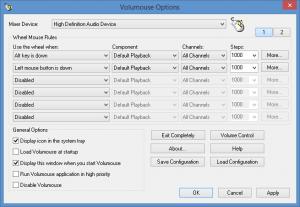
Left click the icon and you will be presented with the Options menu. From said menu you can customize the way Volumouse works: choose when to use the wheel, select a mixer device, pick an audio channel, save/load configuration, choose to launch Volumouse at startup, and so on.
Right click the Volumouse icon in the system tray and you will be presented with a context menu that lists the following:
Options – access the aforementioned Options menu.
Volume Control – open the Windows volume mixer.
Disable – disable Volumouse.
Exit completely – close the application.
Say you don’t play with any of the options and settings. You just download Volumouse and install it on your Windows-powered PC. Once it’s up and running, you can adjust the volume by using the scroll wheel in combination with the Alt key or the left mouse click. Hold down Alt or hold down the left click, and scroll up to increase the volume. Hold down Alt or hold down the left click, and scroll down to decrease the volume.
Volumouse is offered by NirSoft for free. Please note that NirSoft offers more than 100 utilities for free. If you find any of them useful, do consider making a donation.
While Volumouse is up and running, you can adjust the sound volume by using the scroll wheel. Hold down Alt or left click and scroll up/down to increase/decrease the volume.
Pros
Support for all Windows editions from Windows 98 to Windows 8 is provided. From the Options menu you can play with several settings that govern how Volumouse works. Use the application to easily adjust the sound volume. Volumouse is free software (donations are welcome).

Cons
The fact that I have volume buttons on my keyboard means I don’t really need this software.

Volumouse
2.03
Download
Volumouse Awards

Volumouse Editor’s Review Rating
Volumouse has been reviewed by George Norman on 16 Sep 2014. Based on the user interface, features and complexity, Findmysoft has rated Volumouse 4 out of 5 stars, naming it Excellent







